Full-Stack UX Engineer

Hi, I am Taro
Full-Stack UX Engineer, you've probably never heard of this role because it's a term that I coined to best describe what I do.
I studied User Experience (UX) in grad school and graduated during the COVID-19 pandemic. I took advantage of the drastic economic slowdown and decided to fill in the gap that existed between UX experts and software developers. Most UX experts understand how end-users operate but very few can effectively call API and program the very UI that is under analysis.
As a Full-Stack-UX-Engineer, I have experience in both domains. I can help organizations and teams that are yet to build a dedicated UX team from studying users’ behaviors and product’s usability to actually programming it
Click to view: Full-stack Web/App Projects
Click to view: UX/HF Research
Web/App Dev
Full Project Websites:
Resume - Job Description Comparison App
Overview
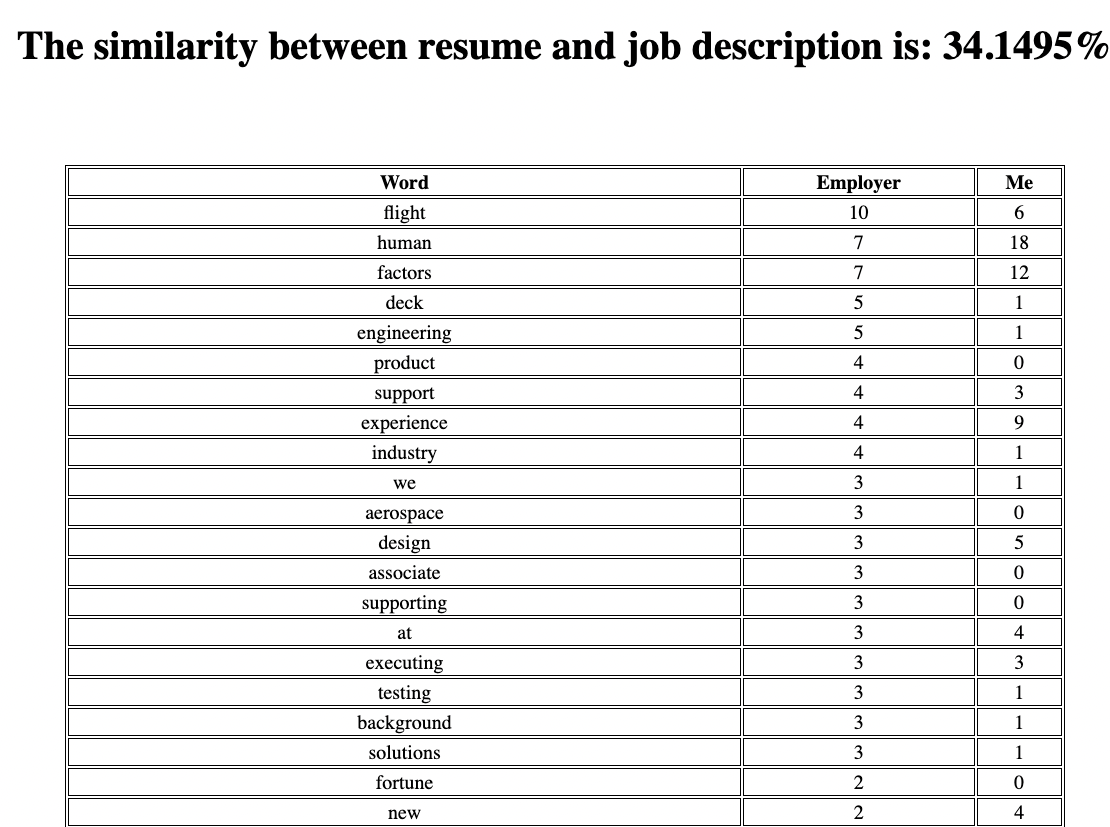
- Develped an algorithm to compared two text files
- Reads text files removes conjunctions and other irrlelvant words (e.g., our, much, at)
- Makes a list of all remaining words for each file (i.e., resume & job description)
- Counts how many times each word appeared in the file
- Take words and counts from both files and creates pandas DataFrame which is sorted by job description words in descending order
- Uses scikit-learn and calculates the similarity
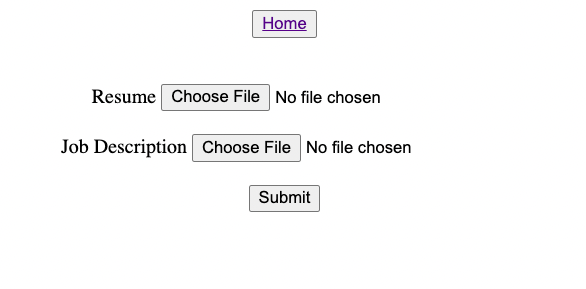
Input Page
Output Page
Data Science: Organization Employee Analysis
Overview
- Read data from multiple csv, txt, and xcel files that has all employee information, raise schedule, raise amout, and etc.
- Clean extracted data (e.g., remove symbols)
- Decipher salary for specific employees
- Create pandas DataFrame with extracted data
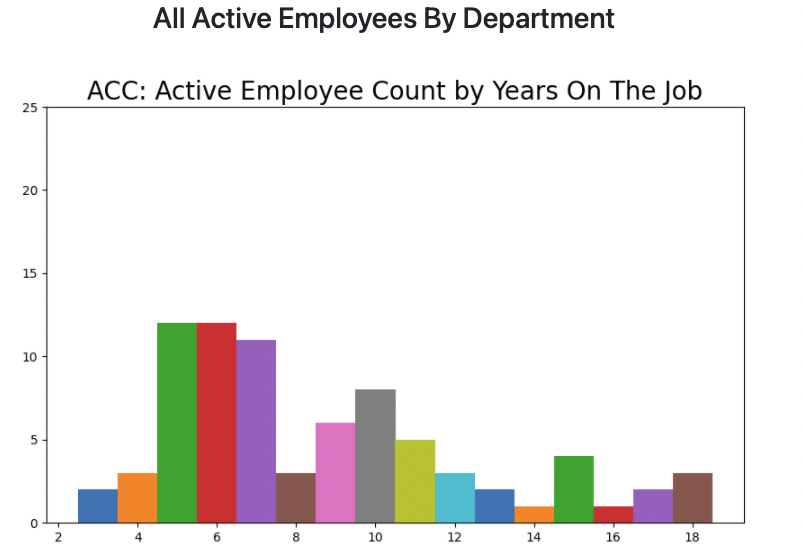
- Calculate how long each employee has worked by subtracting one's first day from today
- Group employees by department
- Group employees by the years worked
- Create a bar graph for each dept using matplotlib
- Convert bar image to url via base64
- Use Flask & Jinja to export image to html
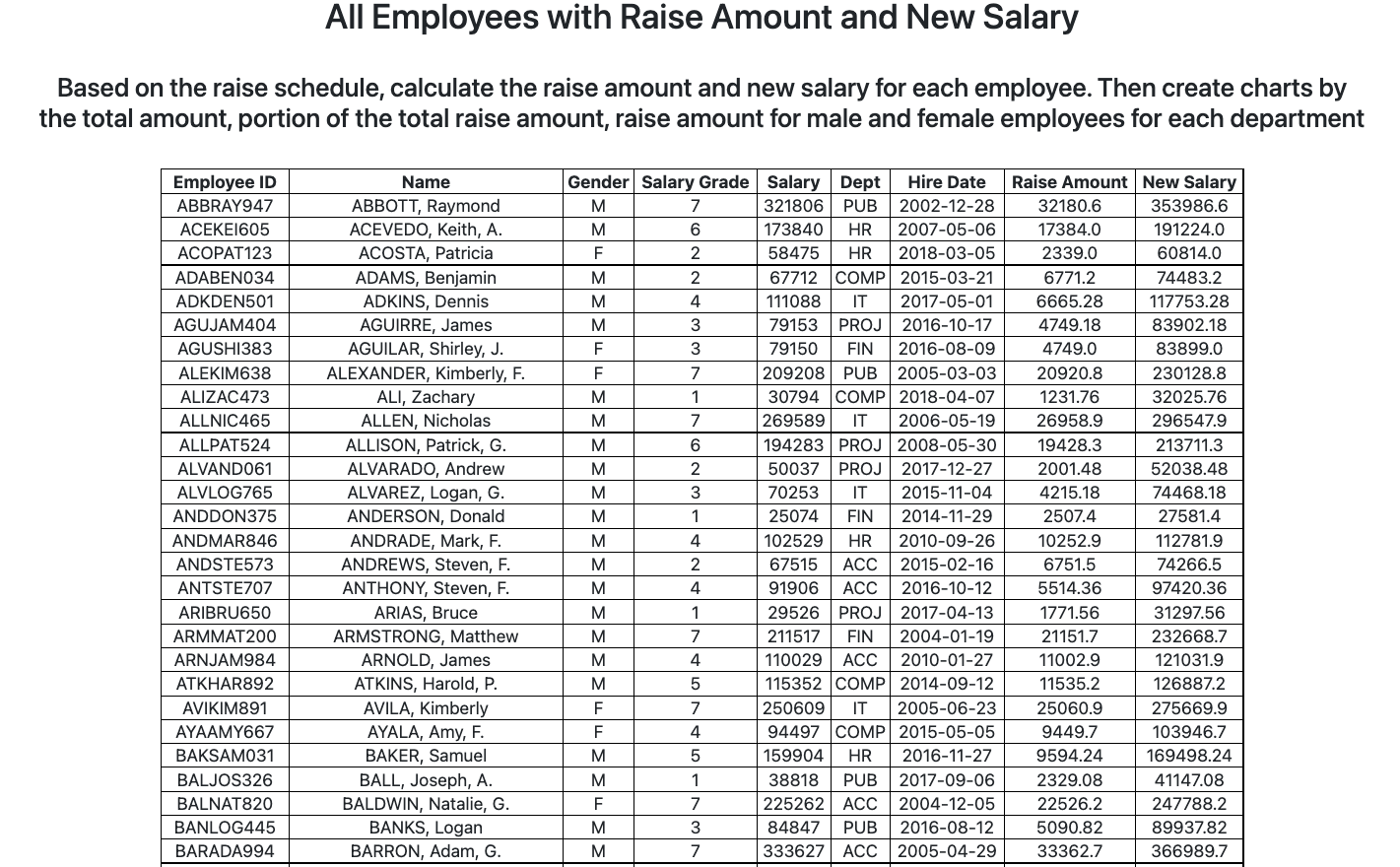
- Calculate raise amount and the salary in accordance to raise schedule for each employee
- Add calculated values to main table for all employees
- Create table using html
- Populate html talbe using Jinja
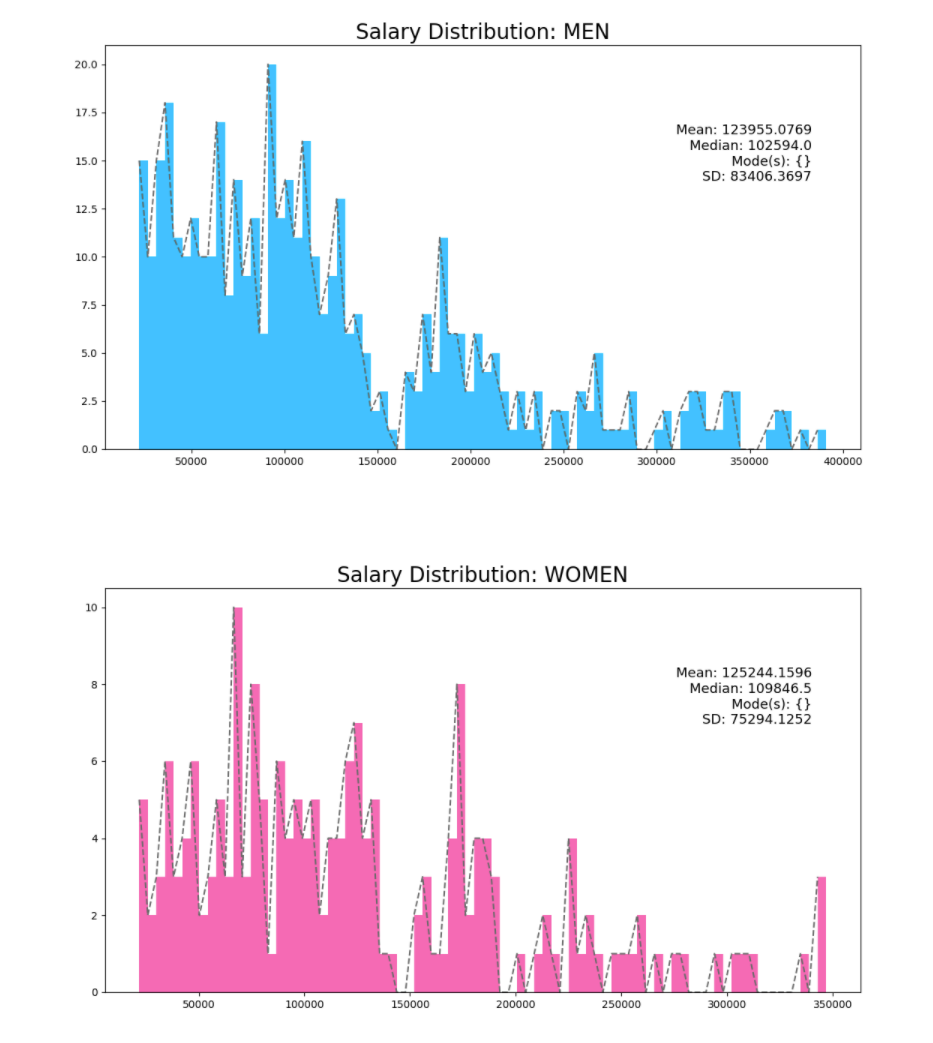
- Group employees by gender
- Use matplotlib to create a distribution curve for salary for eeach gender
- Convert bar image to url via base64
- Use Flask & Jinja to export image to html
Application: Health Care Portal
overview
- Create health care portal accessible by web browswers and create & store data in a database
- Read & clean all files that conatain data for this project
- Analyze extracted data and create tables in database accordingly (e.g., consistent column names)
- Connect to database and upload cleaned data to appropriate tables



Medical Code Search
- Takes a complete medical code
- Search database for given code
- Returns all information
- Dispaly the result in table using jinja & html


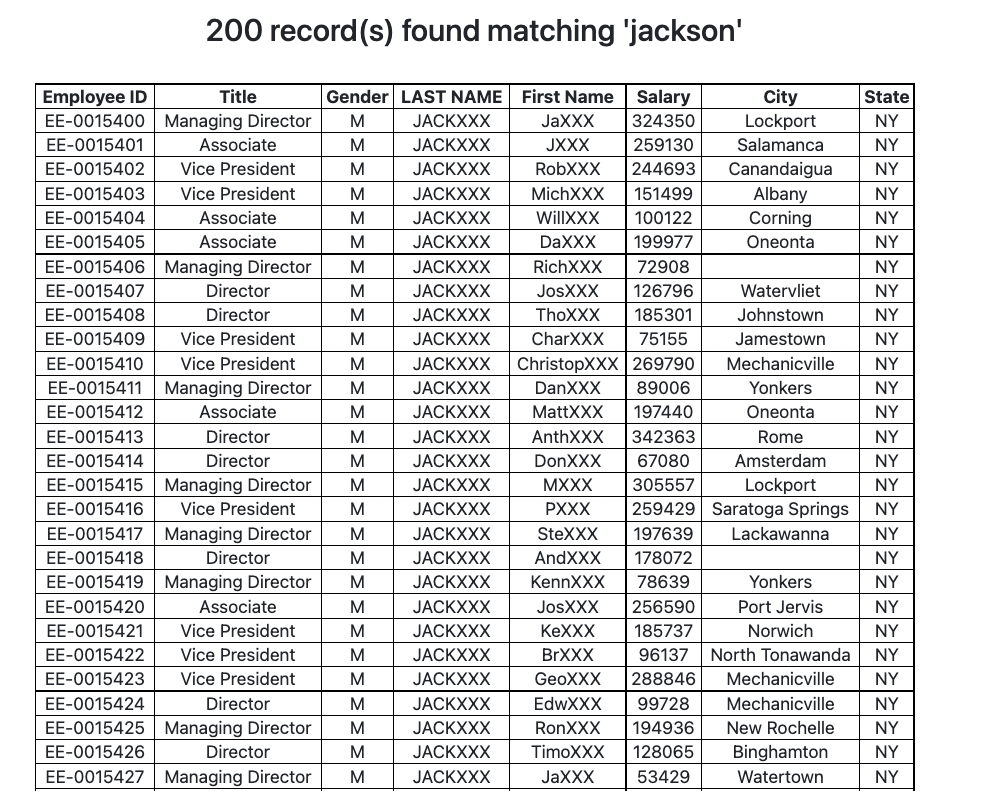
- Takes a partial or complete last name
- Searches database for given name
- Returns all info on employees whose last name match or include the name under search
- Turns the last 3 letters of each employee's last & first name into "X"
- Counts the number of record found
- Dispaly the result in table using jinja & html
HF/UX Research
Application Portal Evaluation
overview
- Assess and improve the usability of the application portal
- Data collection via:
- Difficulty Assessment
- Umux Lite
- TUS
- MS Desirability Toolkit
- ID problem(s)
- Solve them!
Research Questions & Goals
- Uncover Usability Deficiencies
- Find Opportunities
- Benchmark with Metrics
- Identify Solutions
methodology
- Participants: 20 users (12 remote & 8 in-person | 11 females & 9 males | between 19 - 51)
- UX Tools:
- UserTesting.com
- Morae
- Google Drive
- Sketch
- Metrics:
- UMUX Lite
- NPS
- Task Usability Scoring
- MS Desirability Reaction Words
results
| Task |
Avg. Ease |
| Locate and start the application |
3.67 |
| Sign in to the portal |
4.3 |
| Fill out the application |
4.4 |
| Leave the application and go to the dashboard |
4.0 |
| Find the progress displayed in percentage |
4.8 |
| Edit the application |
5.0 |
| Go back to the application and complete |
5.0 |
solutions
Clearer and Brighter Content Display
| Before |
After |
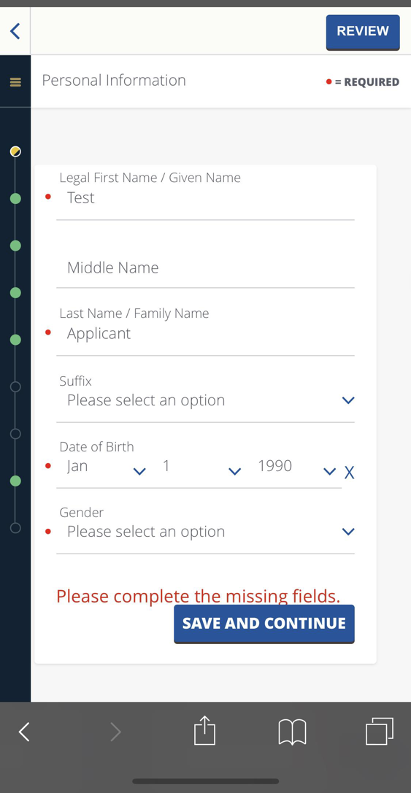 |
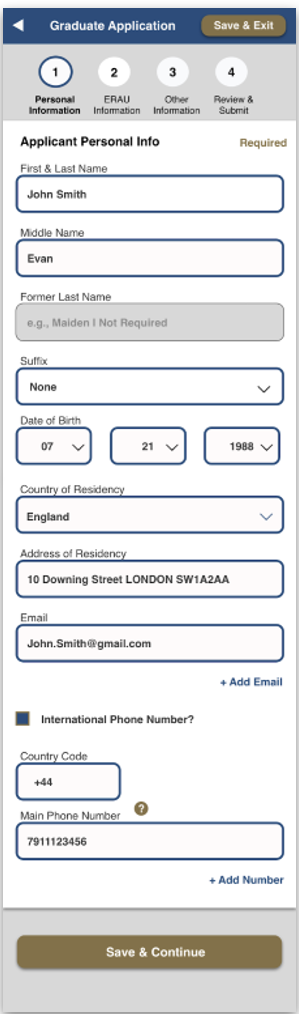 |
summary
5 Key Design Improvements
| Description |
Action |
| Explain why users need to creat new account |
Provide explanation |
| Make UI more user-friendly |
- Clearly outline sections & steps
- Consolidate questions
- Use activated buttons & tool tips
|
| Redesign review process |
Make it simpler |
| Make entire process simpler |
- Devide into sections (instead of a long continuous one)
- Sction to upload required documents
|
| Create Dashboard |
Dashboard that outlnes all steps/sections to be completed |
Work
Lead Full-Stack Developer
Geaux Network
Jul 2022 - Present
- Engineered over 10,000 sets of data pertaining to service users and providers
- Managed Firebase server & database
- Resolved/debugged over 200 conflicts
- Executed 2 UX study on products UI
- Developed back-end program with Python and Django
- Managed front-end program using JavaScript, React, and Node
Machine Learning Data Analyst
SalesForce
Jun 2022 - Present
- Assisted in AI/ML development
- Analyzed over 2,000 data collected by machine learning model currently under development
Assist. Instructor
Sasaki Judo
Nov 2022 - Present
- Inspired and trained young students with Autism Spectrum Disorder through Judo
- Provided insights to UCF Dept. Health Science
Group Fitness Instructor
Embry-Riddle Aeronautical University
Jun 2022 - Sep 2022
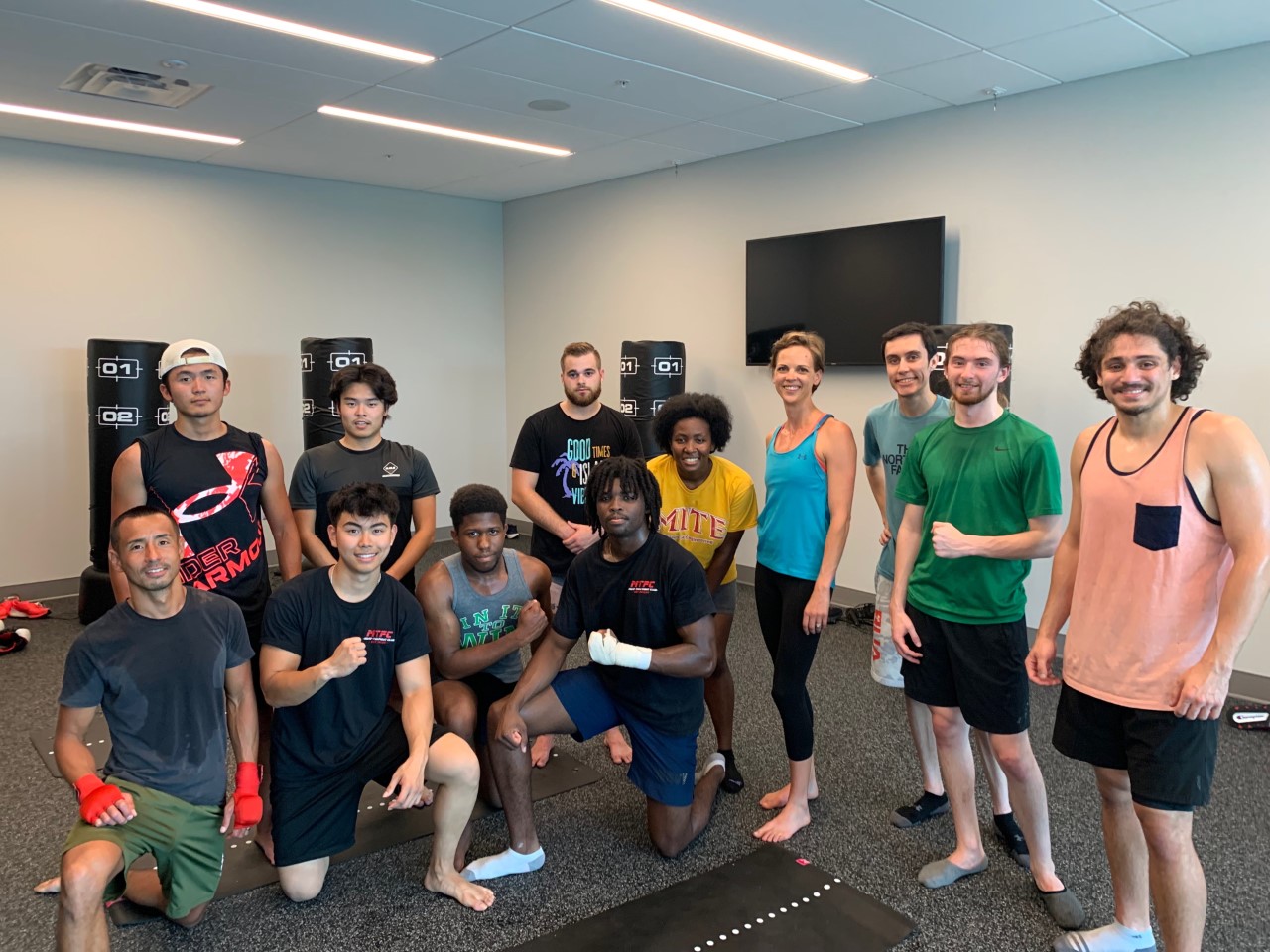
- Coach and help students achieve their fitness goals
- Developed a very unique and effective training program based on my experience in MMA training
Linguistic Tester
WeLocalize
2020 - 2021
- Evaluate user input collected by client
- Refine & update existing system’s interpretation of user’s command & queries
- Provide information for client's AI
UX Researcher
Embry-Riddle Aeronautical University:
Aging, Perception & Performance Lab (APPL)
2018 - 2019 & 2020 - 2021
- Support APPL’s lead researcher and principal researcher
- Identify target & goals
- Evaluate research methods
- Conduct literature review
- Develop surveys
- Data collection & anaysis
- Develop research reports
Japanese Office Manager & Safety Investigtor
Mitsubishi Aircraft Corp. America
2019 - 2020

- Flight Safety Management Office
- Facilitate cross-cultural & cross-departmental efforts
- Bridged Japan-US cultutal gaps
- Initiated and led Foreign Object Debris Committee & Occupational Safety Improvement that involved several depts
- Made significant contribution in executing an enterprise-wide event organized by our team
Emergency Service Dispatcher
Japan Ministry of Defense
2013 - 2019

- 100% team work: members rely on one other to complete the job
- Effectively interview anxious, terrified, and / or disturbed callers
- Obtain information essential for first-responders
- Become thoroughly familiar with other team members' roles to provide direct assistance when necessary
Education
2021 - 2022
Code Immersives (Digital Film Academy)
Python Computer rogramming Certificate

- GPA: 3.90
- Python: 900 hours of Programming
- Databse Operation: store, retrieve, & update database via MySQL, SQLite, SQLAlchemy, & MongoDB
- Data Science: develop autonomous process and vasualization (charts & tables) of large data via pandas, matplotlib, & scikit-learn
- Web Development: utilize Flask, Django, Jinja & html
- Version Control System: utilize Github and collaborate with other developers
- Amazon Web Service (AWS): learn the fundamentals of AWS
2017 - 2019
Embry-Riddle Aeronautical University
Master of Science: Human Factors

- GPA: 3.33
- Human Computer Interaction (HCI)
- Statistical Analysis
- Research Methods
- Human Factors Engineering
- Ergonomics
- Aviatino Finance
- Corporate Finance
2015 - 2017
University of Maryland University College
Bachelor of Science: Psychology
- GPA: 3.89
- Research Methods
- Cross-Cultural Psychology
- Statistics
- Psychological Statistics,
2006 - 2009
University of South Floridae
Bachelor of Arts & Science: Economics
- Computers in Business
- Principles of Management
- Business Calculus
Skills

Computer programming & Data Science
- Python
- Amazon Web Services (AWS)
- Java Script
- MySQL
- SQLite
- SQLAlchemy
- MongoDB
- Data Analysis
- Data Visualization
- Data Cleaning
- numpy
- pandas
- matplotlib
- scipy
- scikit-learn
- Software Development Life Cycle (SDLC)
- Version Control System
- Github
- Gitlab
- Debugging/Debug
- Unit Test
- Refactoring/Refactor
- Application/Website Launch
- Flask
- Django
- Jinja
- html
- static
- templates
- Models
- api
- app
Human Factors (HF) & User Experience (UX)
- User-Centric Design
- User-Centered Design
- Human Computer Interaction (HCI)
- Task Analysis
- Cognitive Analysis
- Interface Anaysis
- Workload Assessment
- Situational Awareness Assessment
- Heuristic Evaluation
- Hierarchical Task Analysis
- Human Factors Analysis Classification System (HFACS)
- Software & Website Prototype/Mockup
- NASA TLX
- Website Analysis & Measurement Inventory (Interface Analysis)
- Task Performance Time Analysis
Research & Statistics
- ANOVA
- MANOVA
- T-test
- Correlation
- Regression
- Factor analysis/li>
- Survey
- Natural Observation
- Remote Observation
- Direct Observation
- Focus Group
- Card Sorting
- Interview
- SPSS
Communication Skills
- Organize cross-cultural team efforts
- Organize cross-departmental team efforts
Ptototype & Mockup
Office Software
- Microsoft Office Word
- Microsoft Office PowerPoint
- Microsoft Office Excell
- Microsoft Office Teams
- Microsoft Office Outlook
Languages
- Japanese (mother tongue)
- English
Contact
email: taro.ito.hf@gmail.com
Elements
Text
This is bold and this is strong. This is italic and this is emphasized.
This is superscript text and this is subscript text.
This is underlined and this is code: for (;;) { ... }. Finally, this is a link.
Heading Level 2
Heading Level 3
Heading Level 4
Heading Level 5
Heading Level 6
Blockquote
Fringilla nisl. Donec accumsan interdum nisi, quis tincidunt felis sagittis eget tempus euismod. Vestibulum ante ipsum primis in faucibus vestibulum. Blandit adipiscing eu felis iaculis volutpat ac adipiscing accumsan faucibus. Vestibulum ante ipsum primis in faucibus lorem ipsum dolor sit amet nullam adipiscing eu felis.
Preformatted
i = 0;

while (!deck.isInOrder()) {
    print 'Iteration ' + i;
    deck.shuffle();
    i++;
}

print 'It took ' + i + ' iterations to sort the deck.';
Lists
Unordered
- Dolor pulvinar etiam.
- Sagittis adipiscing.
- Felis enim feugiat.
Alternate
- Dolor pulvinar etiam.
- Sagittis adipiscing.
- Felis enim feugiat.
Ordered
- Dolor pulvinar etiam.
- Etiam vel felis viverra.
- Felis enim feugiat.
- Dolor pulvinar etiam.
- Etiam vel felis lorem.
- Felis enim et feugiat.
Icons
Actions
Table
Default
| Name |
Description |
Price |
| Item One |
Ante turpis integer aliquet porttitor. |
29.99 |
| Item Two |
Vis ac commodo adipiscing arcu aliquet. |
19.99 |
| Item Three |
Morbi faucibus arcu accumsan lorem. |
29.99 |
| Item Four |
Vitae integer tempus condimentum. |
19.99 |
| Item Five |
Ante turpis integer aliquet porttitor. |
29.99 |
|
100.00 |
Alternate
| Name |
Description |
Price |
| Item One |
Ante turpis integer aliquet porttitor. |
29.99 |
| Item Two |
Vis ac commodo adipiscing arcu aliquet. |
19.99 |
| Item Three |
Morbi faucibus arcu accumsan lorem. |
29.99 |
| Item Four |
Vitae integer tempus condimentum. |
19.99 |
| Item Five |
Ante turpis integer aliquet porttitor. |
29.99 |
|
100.00 |